Hi , I am Akshit Gupta of Btech 2010. I got the opportunity to lead the lab session 5 for the Group-1.The topic of the lab session that I lead was "Unix Commands".I did the lab session with Akshay Rajvanshi.
The topic that we were allotted was not only tough but also challenging enough to be taught. Besides that it was also boring as well.
Our training for the lab session that was taken by a MTech student was not up to the mark as she herself had not prepared well. So before the day when I had to lead the lab session ,we had to refer to various sites to enhance my knowledge as well as clear my doubts .
On the day that I had to lead the session , I had viral fever which made the things worse for me. During the lab session as it was boring topic to be taught it was difficult to gather the interest of the students. Clearing many of their doubts as well as teaching them a difficult topic was a challenging task. However many students helped us a lot by leaving the class well before time.
But at the end of the day it was a satisfying experience after I got good reviews from my peers regarding the lab session.
Sunday, September 12, 2010

Our experience of leading a LAB Session.
Well,writing a blog over your experiences can sometimes be the hardest task in the world..though in our case that isn't true..
We would first like to tell everyone what we felt about this idea of students leading Lab sessions.It was not a surprise as coming from Amarjeer sir,we do expect some interesting ideas that structure his teaching style.Though we would want to mention that he has his boundations. We all were soo happy that SM course would not have a theory exam,but then there are some college rules(and we all hate them). So,finally SM has it's theory exam.But about the part that SM is focussed about i.e. PRACTICALS , we can just say that students acting as LAB INSTRUCTORS not just gets in a sense of responsibility in us but also it gets us into the instructor's shoes and have the experience,know what an instructor has to go through before and during the session,the hardwork that is put into it. And for sure,now we actually know that it's not just about those 2 hours in the lab..it's much MORE..
And we can bet.. Once one goes through the experience,the training by Arjun bhaiya and Samy sir,feels the heat for 5-6 long hours,and then the practice and structuring of the lab session at home.., he can understand that it is not an easy job.It automatically makes you respect ur peers too when it's their chance to lead the lab session when it's their chance.
We got our chance ,finally, in the 4th lab session that was about
utilities in Linux and windows.Well,at first look,anyone would find the windows part pretty boring,because we've been doing it all these years,though the LINUX part was new to us.
Once Samy sir started,we were a little amazed,both of us never knew that a tast manager could do soo much in windows,or may how can we utilize a task scheduler,it was fun then.However,the LINUX part was much more intensely taught,most of those things that we never knew.It was too not even 2 hours that all of us got so tired that we asked sir for a pool break,we played some pool and then we were back in form.haha..3 more hours after that and we all went back,it was raining and all of us really enjoyed the trip back to our homes.
Well we had almost a week to prepare the lab session as group I used to have it's lab session a week later than every other group. So,the week just went by,and it was weekend already,we called each other up and structurised the whole lab session,we decided that I would do the LINUX part and Apoorv ,the WINDOWS part.We also decided how much time we would spend on each topic and we were done.It took us almost 2 hours to structure that and then another 4-6 hours for getting into the details of each command.Also,we just revised everything we wanted to do the next day.
Finally,It was the D day,23rd August,Lab session 4,Computer Lab -1.We had almost full strength that day and it was really funny when each of them wished us ALL THE BEST before getting into the lab.We started on a very DHAMKI-BHARA note that "Please co-operate with us and grade us whole heartedly,and remember,you will also be standing here sooner or later"..hehe..
We started and felt it was going very smooth,with I and Apoorv doing all the topics together regardless of it was of WINDOWS or LINUX because we were now thorough we all the topics and all the utilities.It was annoying to have Akshit asking funny questions but we never let our emotions let go,it was also making us nervous when Amol or Adway would ask a technical question,but then we could answer all the doubts without fail and it felt really awesome..It was a fulfilling experience to see everyone learning,enjoying and we were the instructors(The best part)..Well,this was something that the two of us would never forget as it was us,who were teaching our peer group,helping them as if we were the bonds of those utilities..
All we can do now,is thank Amarjeet Sir for giving us the opportunity,the chance to experience what he luckily experiences each day.
Thank you.
Arjun and Apoorv
Group -I
We would first like to tell everyone what we felt about this idea of students leading Lab sessions.It was not a surprise as coming from Amarjeer sir,we do expect some interesting ideas that structure his teaching style.Though we would want to mention that he has his boundations. We all were soo happy that SM course would not have a theory exam,but then there are some college rules(and we all hate them). So,finally SM has it's theory exam.But about the part that SM is focussed about i.e. PRACTICALS , we can just say that students acting as LAB INSTRUCTORS not just gets in a sense of responsibility in us but also it gets us into the instructor's shoes and have the experience,know what an instructor has to go through before and during the session,the hardwork that is put into it. And for sure,now we actually know that it's not just about those 2 hours in the lab..it's much MORE..
And we can bet.. Once one goes through the experience,the training by Arjun bhaiya and Samy sir,feels the heat for 5-6 long hours,and then the practice and structuring of the lab session at home.., he can understand that it is not an easy job.It automatically makes you respect ur peers too when it's their chance to lead the lab session when it's their chance.
We got our chance ,finally, in the 4th lab session that was about
utilities in Linux and windows.Well,at first look,anyone would find the windows part pretty boring,because we've been doing it all these years,though the LINUX part was new to us.
Once Samy sir started,we were a little amazed,both of us never knew that a tast manager could do soo much in windows,or may how can we utilize a task scheduler,it was fun then.However,the LINUX part was much more intensely taught,most of those things that we never knew.It was too not even 2 hours that all of us got so tired that we asked sir for a pool break,we played some pool and then we were back in form.haha..3 more hours after that and we all went back,it was raining and all of us really enjoyed the trip back to our homes.
Well we had almost a week to prepare the lab session as group I used to have it's lab session a week later than every other group. So,the week just went by,and it was weekend already,we called each other up and structurised the whole lab session,we decided that I would do the LINUX part and Apoorv ,the WINDOWS part.We also decided how much time we would spend on each topic and we were done.It took us almost 2 hours to structure that and then another 4-6 hours for getting into the details of each command.Also,we just revised everything we wanted to do the next day.
Finally,It was the D day,23rd August,Lab session 4,Computer Lab -1.We had almost full strength that day and it was really funny when each of them wished us ALL THE BEST before getting into the lab.We started on a very DHAMKI-BHARA note that "Please co-operate with us and grade us whole heartedly,and remember,you will also be standing here sooner or later"..hehe..
We started and felt it was going very smooth,with I and Apoorv doing all the topics together regardless of it was of WINDOWS or LINUX because we were now thorough we all the topics and all the utilities.It was annoying to have Akshit asking funny questions but we never let our emotions let go,it was also making us nervous when Amol or Adway would ask a technical question,but then we could answer all the doubts without fail and it felt really awesome..It was a fulfilling experience to see everyone learning,enjoying and we were the instructors(The best part)..Well,this was something that the two of us would never forget as it was us,who were teaching our peer group,helping them as if we were the bonds of those utilities..
All we can do now,is thank Amarjeet Sir for giving us the opportunity,the chance to experience what he luckily experiences each day.
Thank you.
Arjun and Apoorv
Group -I
Leading Lab session 3
It all started one fine day when me and Utkarsha decided to lead the very first lab session. We figured that since it was an interesting topic which we were probably gonna put to use later on (which we did), we might as well go for it. Also we thought it would be good to get through with it early on.
I arrived late for the training sesssion but still managed to understand just enough so as to be able to understand the language in which the previous handout was written...
:P
We were nervous on D'day but still managed to get through with it somehow...
There were a few hiccups...
We didn't remember the command used in QEMU, some computers weren't working and most importantly, (and i remember this distinctly)it was a very hot day and the AC wasn't working!!!
But overall everything went well. Almost everyone was able to install Ubuntu as dual-boot and also using virtual box(we didn't get to try out vmware tough).
I'm glad we chose to do that lab session as consequent sessions seem to be getting harder and I have no idea how the other group leaders manage.
I would also like to thank everyone in group 4 for being understanding and patient.:)
I arrived late for the training sesssion but still managed to understand just enough so as to be able to understand the language in which the previous handout was written...
:P
We were nervous on D'day but still managed to get through with it somehow...
There were a few hiccups...
We didn't remember the command used in QEMU, some computers weren't working and most importantly, (and i remember this distinctly)it was a very hot day and the AC wasn't working!!!
But overall everything went well. Almost everyone was able to install Ubuntu as dual-boot and also using virtual box(we didn't get to try out vmware tough).
I'm glad we chose to do that lab session as consequent sessions seem to be getting harder and I have no idea how the other group leaders manage.
I would also like to thank everyone in group 4 for being understanding and patient.:)
Saturday, September 11, 2010
My lab lead experience
well, i had to lead the lab on 26th august. our topic was on the linux commands which i frankly found very boring and my group members also approve of this thing...!!!. i had my lab leading 2 saturdays before only because of some holiday i guess....i had some problems as i didn't have ubuntu installed in my PC. but eventually made good use of institute's computers only..was very nervous before the lab leading.
During the lab,i was really scared about amol and arjun asking tricky questions but it went along fine during the lab.. although there were few computers in which the commands weren't responding but we eventually gave our best shot..the lab timings also got extended till 4:45pm,me and akshit eventually got pretty exhausted by the end of the lab!!..and that day i really understood the effort our faculty puts in to teach us.. hats off to our faculties!!!...
overall it was a nice experience and learning one too!!!
During the lab,i was really scared about amol and arjun asking tricky questions but it went along fine during the lab.. although there were few computers in which the commands weren't responding but we eventually gave our best shot..the lab timings also got extended till 4:45pm,me and akshit eventually got pretty exhausted by the end of the lab!!..and that day i really understood the effort our faculty puts in to teach us.. hats off to our faculties!!!...
overall it was a nice experience and learning one too!!!
ADVANTAGES AND DISADVANTAGES OF TCP AND UDP
since, rhea talked about TCP, i would like to throw some light on the advantages and disadvantages of TCP and UDP.
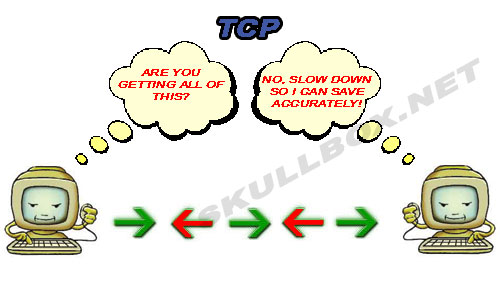
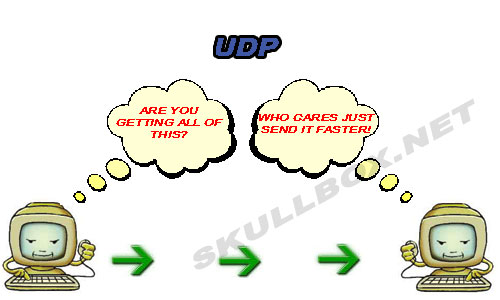
I have only included those points which i could understand after reading . there are loads of points available on google on the advantages and disadvantages of TCP and UDP which you could refer.
ADVANTAGES OF TCP
(1) TCP always guarantees three things - your data reaches its destination,it reaches there in time and it reaches there without duplication.
(2) in TCP, since all the work is done by the operating system, so you just need to sit back and watch the show. Even the debugging is taken care of by your OS.
(3) It automatically breaks up data into packets for you.
(4) It is slower in functioning than UDP
DISADVANTAGES OF TCP
(1) since, all the work is being done by your OS, so if there are bugs in your OS, then you will face many problems like problems in surfing and downloading contents from the net.
(2) TCP cannot be used for broadcast and multicast connections.
ADVANTAGES OF UDP
(1) Broadcast and multicast connections are available with UDP which is not the case with TCP.
(2) It does not restrict you to connection based communication model
(3) Much faster than TCP
DISADVANTAGES OF UDP
(1) There are no guarantees with UDP. It is possible that a packet may not be delivered, or delivered twice, or delivered not in time.
(2) you have to manually break the data into packets
Comments are always welcome :)
Comments are always welcome :)
WHAT IS A PROTOCOL? (Focus on TCP/IP)
Hi everyone
I was trying to understand the meaning of 'protocol' and the use of TCP/IP with the help of our all-time friend Google. I thought I would write in a blog about the same to save my friends' time searching!
(Just as for most of us, this is my first blog too!)
From all my search on Google, I gathered that:
A protocol is a formal description of message formats and the rules that two or more machines must follow to exchange those messages.
For instance, if two people A & B want to communicate. Imagine the confusion and chaos if they start talking simultaneously. To avoid it, they must follow a set of rules while talking, as to who talks first and for how long etc. This common set of rules would be known as communication protocol for A & B.
Now, there are various protocols used in various types of networks.
TCP/IP is the native protocol of Internet.
These are two separate protocols.
-> TCP (Transmission Control Protocol) deals with the construction of data packets.
(A packet is a sequence of bytes and consists of a header and a body. The header describes the packet's destination and the body contains the data being transmitted.)
->IP routes them from machine to machine.
More technically, TCP provides the service of exchanging data reliably between two network hosts; on the other hand, IP handles addressing and routing messages across one or more networks.
So basically, TCP provides a communication service at an intermediate level between an application program and the Internet Protocol (IP).
-> Basic function of TCP
That is, when an application program desires to send a large chunk of data across the internet using IP, the data has to be broken into IP-sized pieces and then a series of IP requests have to be issued. Here, TCP comes to the rescue. Instead of issuing several requests, the software can issue a single request to TCP and let TCP handle the IP details.
-> Error detection during transfer of data packets
Now, due to network congestion or other unpredictable network behaviour, IP packets can be lost, duplicated or delivered out of order. TCP detects these problems, requests retransmission of lost packets, rearranges out of order packets and even helps reduce network congestion. Once the TCP receiver has finally reassembled a perfect copy of the original message, it passes it to the application program.
Thus, the basic function of the TCP layer is to abstract (recall the concept of Data hiding and abstraction we have studied in programming :D) application's communication from the underlying network details.
->TCP: Accurate delivery rather than timely delivery
TCP guarantees accurate delivery of a data stream from one host to another, i.e., without duplication or loss of data. But it does incur relatively long time delays, for example, while waiting for retransmission of lost messages.
Thus, though it ensures delivery of complete messages, it is not particularly suitable for real-time applications such as Voice over IP. (There are other protocols for such applications, like RTP - Real Transfer Protocol)
AT A GLANCE:
Suppose an HTML file has to transferred across the web. The TCP divides the data into segments and then, forwards them individually to the IP layer. Now, this layer encapsulates each segment into an IP packet, and adds a header containing the destination IP address. Note that even though each packet has the same destination address, they can be routed on different paths through the network. When the segments reach the destination computer, the TCP layer reassembles them and ensures that they are correctly ordered and error free, before streaming them into an application.
I hope this post will help you all!
Any suggestions and comments are always welcome! :)
Friday, September 10, 2010
My Experience Leading Lab Session 3
Even though I didn't have a very challenging topic (Installing Multiple OS), it was very difficult to prepare enough to make sure that I could explain the topic to other students. It took me about 2 hours to prepare for the lab session (I didn't attend the training session), but I didn't know that we weren't going to cover all the methods of installation.
The lab session turned to be surprisingly easy to handle. The teaching assistants occassionally gave some input to us about how we should handle the class. The class didn't misbehave much (mainly because they were afraid of us giving them a bad evaluation when it was their turn to lead :P), and the lab session went along smoothly.
It was great using QEMU and VirtualBox, but I found myself wishing that we could use VMWare Player too. It would also have been nice to have been able to install a version of Windows as a virtual machine.
Personally, I thought that Lab Session 3 was one of the most useful lab sessions because almost everyone used the knowledge they gained during the session later, installing a Linux - based operating system.
Subscribe to:
Posts (Atom)