
This blog is to provide a forum for students enrolled in Systems Management Course at IIIT-Delhi to have a meaningful discussion related to the course.
Tuesday, September 7, 2010
My Experience of Leading Lab Session

Labmare!!
If I can describe this experience in two words, I will say it was an enjoyable 'labmare'.Weird it might seem,but indeed, it was a sort of problematic challenge that ended quite well...
The idea of conducting a lab seemed interesting.We were very eager to try it out as early as possible, but got a chance only this past week.We were called for training on Saturday at 10 am, and as some of you might have anticipated, I was late yet again, and so I missed quite a bit of the explanation part...:-)
Soumya, then helped me out.I tried to understand everything that I had missed and simultaneously made an attempt to keep track of what was going on(Multi-tasking I may say).Unfortunately,it didn't help much, I could not understand what was going on.Thankfully, at that very instant,when matters seemed to be getting out of hand, Madhuri ma'am gave us a break...We went to play TT.We had a great,refreshing one hour.Then we returned to business.
The scene was quite different now, I seemed to understand things better now.Soumya and I tried our hands out on the questions along with our friends from the other sub-groups.We all put our heads together, and finally things seemed to be in place.An exciting day,I must say.
Then began the difficult part.Understanding the things, was easy, but explaining them to others was not going to be.So we put in our efforts,tried to understand the concepts, practiced a little more.And got ready for the day.
(Oh boy!!it was tiring...)
With little confidence,I started the lab session.My mantra "tension kis baat ki hai" really helped.Though, my confidence was low, but I managed to bring conviction in my voice :-).
The lab went on quite well.We were able to help our mates out.They had no complains(at least this was what I felt).Moreover, we got to learn a lot from our group mates, who came up with doubts, that needed some on the spot research.(I was ready for it and so I was carrying a book on LINUX commands :-D).
So on the whole, it ended pretty well.But the effort that went into it made me realise one thing-"Teachers ko toh bohot jyada mehnat karni padti hogi!!"
Thank you sir, for this opportunity, but I would not like to do it again.
Being on the receiving end is much easier... :-D
Thursday, September 2, 2010
Thank you!
It was apparent that you guys had put in effort preparing for it. Thank you for preparing the wonderful performances. I hope you continue putting in efforts not just in this course but in your education all through.
Those of you who took the videos and photographs, can you please share them on the blog or wherever you feel comfortable. And the group working on video editing as their project should see if they can create some good video about this course out of these videos.
Monday, August 30, 2010
Never thought I had to publish this post!
At UCLA, I felt that the graduate education is so much more meaningful since it is very close to real stuff out there and so was my research - hands on.
For joining IIIT-D, one of the primary reasons was the enthusiastic colleagues who were striving to change the undergrad curriculum and make it more meaningful for the next generation. I felt that here is an opportunity to provide my younger friends with something I felt was missing in my undergrad education.
After teaching the PhD level course last semester, I had an opportunity to teach the 3rd year students a course which would have been more meaningful for me with a smaller class size and more interested students. But when there was a discussion of redesigning the system management course and teaching it to the first year students, I got excited and opted for it. Here was an opportunity to teach the students fresh into college, the skills and tools that from my experience are very useful all through the education (and your professional career if you opt for a technical one) but are usually never taught in a class room setting.
A lot of thought went into not just deciding the curriculum but the way teaching should be done. I had always argued with my colleagues and have passed on the same message to all of you that I consider you all as adults - who know what is good and what is bad for your own self; who understand if the other person is working hard for you and have the capacity to reciprocate; who would enjoy the freedom and responsibility given to them (that was often missing when I was a student); and who would love the fun filled teaching style.
But I was so wrong.
Most of you seem to be corrupted beyond a position of return. And the rest of you follow the suit by not raising a voice against it. The person committing the wrong deed is probably your friend and by letting him do it, you are not abiding by the true rules of friendship but actually going against it.
College life indeed is fun and I will be the first one to vouch for it. I thought I could design a course that could make it even better. It is for that purpose, I included the individual assignment so that you will be forced to take out time for doing something you always wanted to do but it took a backseat. It is for this purpose I thought if you guys can learn better by trying to create a play/video out of whatever you learn in the class.
All this means extra work for me as well. I can very easily come and speak up in the class, leave, take exams and then just grade in the end. I never got the sort of feedback I expected. But I still thought that it will take you all some time to adjust and was always willing to give you guys that breathing space.
Today, I was dejected.
There should be some principles in everyone's life that one should always adhere to - no matter what. If you are not interested in the course, accept a lower grade and you should be able to justify it later. Grades do not matter in the long run, principles do. And it is often almost impossible to unlearn things as you grow older. You are in that critical moment of your life when you can question how things have been in the past and create a vision about how you want them to be. If you do not create these set of principles for yourself, you will be leading a hollow life all through. And the sad part is that the realization of this will occur when it is already too late.
I hope at least some of you will do certain introspection after what happened today. It was just a small quiz, probably I wouldnt even have included the score in the final evaluation. And cheating to get a few extra marks may just seem to be not a big deal. The act indeed is not. But the idea that you didnt feel bad while doing it is indeed wrong.
Hope you dont learn too many such things which become baggage for the rest of your life since very soon it will be too late to unlearn.
Monday, August 23, 2010
Hi every one!!
Here I am going to tell u something about the new OS by APPLE.As we all know that Mac OS is one of the best OS available in market , so similarly apple comes out with another more simple, reliable, easy to use OS i.e Mac OS X SNOW LEOPARD
But the question arises that ” Why do we need it & How is it different from others??”
So to answer this i would like to highlight few advanced features that MAC OS X SNOW LEOPARD has in comparison to MAC OS X
New looks, new expose & stacks
U can view all open windows in stunning style with a single keystroke.
What is expose??
We can say expose is a sort of feature that unshuffles overlapping windows on your desktop into an organized thumbnail view, so you can quickly locate and switch to any window or get to any file on the desktop. This feature is the one which attracted the whole class during one of the lectures of Amarjeet sir.
For example, say you’re a Keynote maestro and often have up to a dozen documents open at the same time. Exposé makes finding the one you need incredibly easy. Just click and hold the Keynote icon in the Dock, and Exposé tiles your Keynote windows while causing the windows of other applications to fade away. The clutter cleared, you can easily find the document you need. A click makes it the active window, and pressing the Space bar gives you a full-screen preview of the window. Prefer keyboard shortcuts? You can tile application windows with a keystroke, too.(SOURCE:OFFICIAL WEBSITE OF APPLE)

A VIEW OF EXPOSED WINDOW
Faster to wake up and shut down.
With Snow Leopard, your Mac wakes from sleep up to twice as quickly when you have screen locking enabled. And shutting down is up to 80 percent faster which saves lot of time.
Easy text editor
In general it is not easy to edit a pdf file without having a particular software but with advanced features of snow leopard, it is available with OS itself.

A CLIPING TO SHOW EDITING FEATURE
More efficient file sharing.
The Bonjour technology in every Mac makes file and media sharing virtually effortless. Now Bonjour in Snow Leopard makes sharing more energy efficient. If you have a computer in your home or office that shares files — like media files for your Apple TV — you have to leave the computer on all the time, which isn’t very energy efficient. With Snow Leopard and a compatible AirPort Extreme or Time Capsule base station, however, your computer can go to sleep yet continue to share its files with other computers and devices, waking when you need it and sleeping when you don’t.
More reliable disk eject.
Snow Leopard improves the reliability of ejecting discs and external drives. Sometimes when an application or process is using the files on a drive, Mac OS X prevents you from ejecting it, but you don’t always know why. In Snow Leopard, you’ll get fewer of those errors and when you do get them, you’ll see exactly which application is using the drive, so you can quit it and eject the drive properly.
Automatic updates for printer drivers.
Snow Leopard makes sure you always have the most up-to-date driver so you can get the most from your printer. When you plug in a printer, Mac OS X can download the latest driver available over the Internet. And it periodically checks to make sure it has the latest driver. If not, it downloads the newest version through Software Update.
Automatic time zone setup.
If you’re traveling around the world, the last thing you want to worry about is whether your computer is set to the correct time zone. Snow Leopard takes care of that for you. Using the Core Location technology, it locates known Wi-Fi hotspots to set the time zone automatically, so you’ll always know the right time no matter where you are.5
The right service at the right time.
The Services menu in Mac OS X lets you use features of one application while working in another. In Snow Leopard, services are more simplified, streamlined, and helpful. The Services menu is contextual, so it shows just the services appropriate for the application you’re using or content you’re viewing rather than all available services. You can access services with a right click of your mouse or Control-click of your trackpad. You can configure the menu to show only the services you want, and you can even create your own services using Automator
Ready for next generation
The entire computing industry is moving from 32-bit to 64-bit technology, and it’s easy to see why. Today’s Mac computers can hold up to 32GB of physical memory, but the 32-bit applications that run on them can address only 4GB of RAM at a time. 64-bit computing shatters that barrier by enabling applications to address a theoretical 16 billion gigabytes of memory, or 16 exabytes. It can also enable computers to crunch twice the data per clock cycle, which can dramatically speed up numeric calculations and other tasks. Earlier versions of Mac OS X have offered a range of 64-bit capabilities. Now Snow Leopard takes the next step in the transition from 32-bit to 64-bit.
Built-in applications like finder,mail,safari,ical,& ichat are now 64-bit which increases speed & eficiencyfor the future.
The 64-bit support in Snow Leopard completely ready for whatever computing enhancements might arrive in the future. For example, Snow Leopard is ready to support up to 16 terabytes of RAM — about 500 times more than today’s Mac computers can accommodate.

Voice over technology
This spl feature which enables computer to receive commands verbally. It is also beneficial for blinds because of the control your computer using gestures on a Multi-Touch trackpad even if you can’t see the screen. The trackpad surface on your Mac notebook represents the active window on your computer, so you can touch to hear the item under your finger & can , drag to hear items continuously as you move your finger, can hear how items are arranged & lot more.
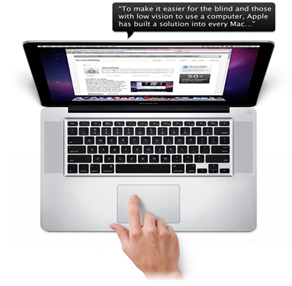
Voice over offers easier & faster web browsing, it can read the whole web page by just accepting gestures . Snow Leopard fully supports HTML web tables without the need for a forms or table mode. You navigate tables using the same commands you already know. You can hear the contents of a table, including the column title and column and row number, by dragging your finger across the trackpad or using simple keystrokes. It also includes vice over tutorial .
More Braille support greater collaboration |
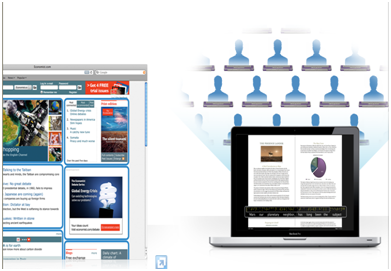
Snow Leopard introduces a new feature, called braille mirroring, that enables multiple USB braille displays to be connected to one computer simultaneously. It’s perfect for classroom settings, where teachers can lead all of their students through the same lesson at the same time, even if the students are using different display models.
There are so many other features but its already too long as a blog so I have to restrict myself here only with a warm welcome to all sort of comments & questions which can help to improve & enhance knowledge.
source:www.apple.com/macosx
Sunday, August 22, 2010
GPGPU - General Purpose computation on Graphics Processing Units
Click on image to enlarge| GPUs powered by the Fermi-generation of the CUDA architecture | Delivers cluster performance at 1/10th the cost and 1/20th the power of CPU-only systems based on the latest quad core CPUs. |
| 448 CUDA Cores | Delivers up to 515 Gigaflops of double-precision peak performance in each GPU, enabling a single workstation to deliver a Teraflop or more of performance. Single precision peak performance is over a Teraflop per GPU. |
| ECC Memory | Meets a critical requirement for computing accuracy and reliability for workstations. Offers protection of data in memory to enhance data integrity and reliability for applications. Register files, L1/L2 caches, shared memory, and DRAM all are ECC protected. |
| Desktop Cluster Performance | Solves large-scale problems faster than a small server cluster on a single workstation with multiple GPUs. |
| Up to 6GB of GDDR5 memory per GPU | Maximizes performance and reduces data transfers by keeping larger data sets in local memory that is attached directly to the GPU. |
| NVIDIA Parallel DataCache™ | Accelerates algorithms such as physics solvers, ray-tracing, and sparse matrix multiplication where data addresses are not known beforehand. This includes a configurable L1 cache per Streaming Multiprocessor block and a unified L2 cache for all of the processor cores. |
| NVIDIA GigaThread™ Engine | Maximizes the throughput by faster context switching that is 10X faster than previous architecture, concurrent kernel execution, and improved thread block scheduling. |
| Asynchronous Transfer | Turbocharges system performance by transferring data over the PCIe bus while the computing cores are crunching other data. Even applications with heavy data-transfer requirements, such as seismic processing, can maximize the computing efficiency by transferring data to local memory before it is needed. |
| CUDA programming environment with broad support of programming languages and APIs | Choose C, C++, OpenCL, DirectCompute, or Fortran to express application parallelism and take advantage of the “Fermi” GPU’s innovative architecture. NVIDIA Parallel Nsight™ tool is available for Microsoft Visual Studio developers. |
| High Speed , PCIe Gen 2.0 Data Transfer | Maximizes bandwidth between the host system and the Tesla processors. Enables Tesla systems to work with virtually any PCIe-compliant host system with an open PCIe x16 slot. |
Wednesday, August 18, 2010
The BIG Graphics card debate and grading

It comes as no surprise that even after the biggest graphics card revolution, most Indians are still unaware of such cards. Most of us tend to neglect this component when buying a personal computer. Later on, they whine about the "pathetic" graphics their monitor displays and they tend to get the monitor replaced (though this is not a common case).

