SORRY, THIS BLOG CAME 1 DAY LATE.
I WOULD LIKE TO START THE BLOG BY RAISING A QUESTION - WHAT IS PARITY BIT ?
PARITY BIT IS A BIT THAT IS ADDED TO THE CODE FOR THE DETECTION OF ERROR DURING THE TRANSMISSION OF THE CODE.
PARITY BIT IS GENERALLY ADDED TO THE LEFTMOST SIDE OF THE CODE.
THERE ARE TWO TYPES OF PARITY-EVEN PARITY AND ODD PARITY. IN EVEN PARITY, THE BIT ADDED IS SUCH THAT THE NUMBER OF 1s IN THE CODE IS EVEN AND IN ODD PARITY, THE BIT ADDED IS SUCH THAT THE NUMBER OF 1s IN THE BINARY CODE IS ODD.
NOW, I WOULD TO THROUGH SOME LIGHT ON HOW PARITY BIT CAN BE USED FOR THE DETECTION OF ERROR DURING THE TRANSMISSION OF THE CODE. GENERALLY, AN EVEN PARITY IS CREATED AT THE TRANSMISSION END BY THE ADDITION OF DESIRED BIT. THEN, THE CODE IS TRANSMITTED AND THE PARITY OF THE CODE IS CHECKED AT RECEIVING END. IF THE PARITY OF THE CODE HAS CHANGED FROM EVEN TO ODD, THEN, IT MEANS THAT EITHER 1 OR 3 OR AN ODD NUMBER OF BITS ( EXCEPT THE PARITY BIT ) IN THE CODE HAVE CHANGED THEIR VALUES DURING TRANSMISSION.
BUT, IF THE PARITY OF THE CODE REMAINS SAME, THEN THERE ARE TWO POSSIBILITIES THAT EITHER THE CODE IS SAME (MORE PROBABLE) OR AN EVEN NUMBER OF BITS HAVE CHANGED THEIR VALUES DURING TRANSMISSION( LESS PROBABLE ). THIS IS THE LIMITATION OF THE PARITY BIT. BUT THE CASE OF EVEN CHANGES OF BITS HAPPENS QUITE LESS TIMES, HENCE, THE PARITY BIT METHOD IS A GOOD WAY TO DETECT ERROR IN THE CODES DURING TRANSMISSION.
I WOULD LIKE TO EXPLAIN THE ERROR DETECTION PROCESS BY AN EXAMPLE - SUPPOSE 0110001 IS THE CODE TO BE TRANSMITTED(NOTE THAT NUMBER OF 1s IN CODE IS ODD ). NOW, BY ADDING 1 TO THE LEFT OF THE CODE, THE CODE BECOMES EVEN PARITY AND THE NEW CODE IS 10110001. THIS CODE IS TRANSMITTED TO THE RECEIVER WHERE ITS PARITY IS CHECKED. IF THE CODE RECEIVED IS 10100001, THEN , IT MEANS THE PARITY HAS BECOME ODD WHICH CAN BE DETECTED. BUT, IF THE CODE RECEIVED IS 11100001, THEN, THOUGH TWO BITS HAVE CHANGED THEIR VALUES DURING TRANSMISSION, BUT THE PARITY OF THE RECEIVED CODE IS SAME , SO SUCH KIND OF ERRORS CANNOT BE DETECTED USING PARITY BIT.
IF YOU HAVE ANY QUESTION TO ASK OR ANY ADVICE ON HOW TO MAKE THIS BLOG MORE INTERESTING, THEN FEEL FREE TO COMMENT .
Wednesday, August 4, 2010

Monday, August 2, 2010
QUERY
Hello everyone
I wanted to know what is FSB? what are its physical significance & where is it located??
it would be quite helpful for me to undertsand FSB if any of u posts the answer of my doubts
I wanted to know what is FSB? what are its physical significance & where is it located??
it would be quite helpful for me to undertsand FSB if any of u posts the answer of my doubts
PARITY BIT
PARITY BIT is a bit that is added to ensure that the number of bits is even or odd.
There are 2 types of parity bits:
1. Even parity bit
2. Odd parity bit
EVEN PARITY BIT
In the even parity if in a data for e.g. no of bit 8 ,the no of occurence of 1's is odd no of times, then we add 1 to it making entire set of bit even and making overall bit =9
e.g. 10001001 (1 occuring 3 times)
110001001 (even parity)
and if the occurence of 1's is even no of times then we add a zero to make it even.
e.g 10001101 (1 occuring 4 times)
010001101 (even parity)
ODD PARITY BIT
In the odd parity , if data bit consists of odd no of 1's we add a zero to it to make it odd.
e.g. 10001001(1 occuring 3 times)
010001001 (odd parity)
similarly if data bit consists of even no of 1's we add a 1 to make it odd.
e.g. 10001101(1 occuring 4 times)
110001101 (odd parity)
Even parity is a special case of a cyclic redundancy check (CRC), where the 1-bit CRC is generated by the polynomial x+1.
If the parity bit is present but not used, it may be referred to as mark parity (when the parity bit is always 1) or space parity (the bit is always 0).
(i hope you like the post. suggestions to improve and include more content clearly is welcomed)
There are 2 types of parity bits:
1. Even parity bit
2. Odd parity bit
EVEN PARITY BIT
In the even parity if in a data for e.g. no of bit 8 ,the no of occurence of 1's is odd no of times, then we add 1 to it making entire set of bit even and making overall bit =9
e.g. 10001001 (1 occuring 3 times)
110001001 (even parity)
and if the occurence of 1's is even no of times then we add a zero to make it even.
e.g 10001101 (1 occuring 4 times)
010001101 (even parity)
ODD PARITY BIT
In the odd parity , if data bit consists of odd no of 1's we add a zero to it to make it odd.
e.g. 10001001(1 occuring 3 times)
010001001 (odd parity)
similarly if data bit consists of even no of 1's we add a 1 to make it odd.
e.g. 10001101(1 occuring 4 times)
110001101 (odd parity)
Even parity is a special case of a cyclic redundancy check (CRC), where the 1-bit CRC is generated by the polynomial x+1.
If the parity bit is present but not used, it may be referred to as mark parity (when the parity bit is always 1) or space parity (the bit is always 0).
(i hope you like the post. suggestions to improve and include more content clearly is welcomed)
VIDEO CONVERTERS

Hello everyone
We all want to have movies or clips on our cell phones but most of us have video clips(in 3 gp) with an awful quality. Imagine hearing some bollywood song in 3gp,it emits a creaking sound here is a solution-
first of all look into your phone's manual and find what are the video formats supported and what is your screen resolution.
 if you love to watch clips or songs on your cell log on to www.effectmatrix.com and download total video converter. It is an excellent converter which gives superb video aand audio quality.import files and convert them.You can set the quality screen size etc,if not sure jast select your phone model(if nokia and sony),explore the options.
Movies take a lot of time to convert so you have to compromise with quality,just use freez 3gp converter avaliable on smallvideosoft.com,believe me its the fastest . I have converted a whole dvd by freez in just 38 min 25 seconds !!

Endianness
Before i start with this post, i would like to share with my friends that this my first experience at bloging or any sort of posting on the net, i hope it is worth your precious time....
Endianness deals with integer representation in a computer . Now, we all know that there are certain human languages that are read from left to right like English,Hindi and then there are some languages like Arabic that are read from right to left.Similarly, integers are represented as sequence of bytes with the most significant byte on the left(The Big Endian),in some representations, while in others it is placed on the right(The little Endian).
Now lets see the main advantage of the two systems:-
1)The little Endian system has the property that the same value can be read from the memory at different lengths... Therefore, the value read from 32-bit memory can be read from the same address as either 16-bit memory or 8-bit memory. all of which retain the same numeric value.
2)The big Endian representation helps to obtain an approximation of the multi-byte value by reading the most significant portion instead of the complete representation.
Address Big-Endian representation of 1025 Little-Endian representation of 1025
00 00000000 00000001
01 00000000 00000100
02 00000100 00000000
03 00000001 00000000
For moe info, you can use the following links:-
http://en.wikipedia.org/wiki/Endianness
http://3bc.bertrand-blanc.com/endianness05.pdf
Endianness deals with integer representation in a computer . Now, we all know that there are certain human languages that are read from left to right like English,Hindi and then there are some languages like Arabic that are read from right to left.Similarly, integers are represented as sequence of bytes with the most significant byte on the left(The Big Endian),in some representations, while in others it is placed on the right(The little Endian).
Now lets see the main advantage of the two systems:-
1)The little Endian system has the property that the same value can be read from the memory at different lengths... Therefore, the value read from 32-bit memory can be read from the same address as either 16-bit memory or 8-bit memory. all of which retain the same numeric value.
2)The big Endian representation helps to obtain an approximation of the multi-byte value by reading the most significant portion instead of the complete representation.
Address Big-Endian representation of 1025 Little-Endian representation of 1025
00 00000000 00000001
01 00000000 00000100
02 00000100 00000000
03 00000001 00000000
For moe info, you can use the following links:-
http://en.wikipedia.org/wiki/Endianness
http://3bc.bertrand-blanc.com/endianness05.pdf
Blu-ray Discs
Blu-ray discs are optical storage media and look similar to regular CD/DVDs (they are all of the same size). But they can store 10 times the data in a single DVD.
 NA = nsinθ ; n = refractive index. Since θ1>θ2, NA(BD) > NA(DVD)
The name "Blu-ray" comes from the blue laser being used to read and write. There are GaN (Gallium Nitride) diodes that produce photons of 405nm directly. 400nm is the wavelength of the violet component of the visible spectrum so the "blue laser" actually appears violet to the human eye. By decreasing the wavelength from 650 and 780nm used for DVDs and CDs respectively, and increasing the aperture from 0.60 to 0.85, the laser can be focused to a smaller area. Hence, more data can be stored in the same amount of space.
In BDs, the distance between the surface of the disk and the surface upon which the data is actually recorded is 0.1mm. This is 1/6 times the distance for a regular DVD. Since the discs are made of plastic, the incident angles can change a little due to disc warping. To check this problem, the NA is increased (to an extent) and the cover layer's thickness is decreased.
 Cover layer thickness is reduced to check distortion of the laser spot.
Typical BDs can store 25GB if they are single layered, and 50GB if they are double layered.
"Double-layered" refers to the presence of two recording layers inside the protective cover layer. Each recording layer can store 25GB of data. Pioneer Corp. recently developed a BD with 20 recording layers which allows it to store 500GB of information inside a single BD!
 Structure of single-side, double-layer BD
NA = nsinθ ; n = refractive index. Since θ1>θ2, NA(BD) > NA(DVD)The name "Blu-ray" comes from the blue laser being used to read and write. There are GaN (Gallium Nitride) diodes that produce photons of 405nm directly. 400nm is the wavelength of the violet component of the visible spectrum so the "blue laser" actually appears violet to the human eye. By decreasing the wavelength from 650 and 780nm used for DVDs and CDs respectively, and increasing the aperture from 0.60 to 0.85, the laser can be focused to a smaller area. Hence, more data can be stored in the same amount of space.
In BDs, the distance between the surface of the disk and the surface upon which the data is actually recorded is 0.1mm. This is 1/6 times the distance for a regular DVD. Since the discs are made of plastic, the incident angles can change a little due to disc warping. To check this problem, the NA is increased (to an extent) and the cover layer's thickness is decreased.
Cover layer thickness is reduced to check distortion of the laser spot.Typical BDs can store 25GB if they are single layered, and 50GB if they are double layered.
"Double-layered" refers to the presence of two recording layers inside the protective cover layer. Each recording layer can store 25GB of data. Pioneer Corp. recently developed a BD with 20 recording layers which allows it to store 500GB of information inside a single BD!
Structure of single-side, double-layer BDAnd finally, regarding the popularity of BDs, they are mostly used to store HD videos since the regular DVDs can only store Standard Definition (SD) videos. When HDTVs become widespread, BDs are expected to replace DVDs. For the time being, companies such as Sony, Panasonic, Phillips, Samsung, Pioneer and LG have developed BD drives that are compatible with BDs and DVDs both. This is known as Backward Compatibility and is a measure to ensure that once newer media like BDs become popular, the older storage media do not become obsolete.
Photographs courtesy : http://panasonic.net/blu-ray/technology/
Sunday, August 1, 2010
RAID
RAID stands for Redundant Array of Inexpensive/Independent Disks.
RAID allows a user to store data in multiple places at a time(redundancy) in a balanced way so as to improve performance and data retrieval. It stores the data on multiple hard disks and then combines them into a high performance logical unit where all the drives in the unit are interdependent thus improving Input/Output performance. To put it in simple words, data is spread over different disks but to the operating system and the user, it would appear as if the data is present in one disk only.
An example of improved performance: One set of data is being written to one disk and at the same time another set of data is being retrieved from another hard disk thus speeding up the input/output process.
Thus with RAID we can have:
1) Higher data transfer rate on large data accesses
2) Higher Input/Output rates on small data accesses
Now the question arises "How is the data written to the disks?"
There are several ways of doing this but I shall discuss only 2 of them: Block-level Striping and Mirroring.
Block-level Striping(Raid 0)
In this case, chunks of data is written to different disks. Each disk's storage space is partitioned into "units ranging from a sector(512 bytes) up to several megabytes" (taken from http://searchstorage.techtarget.com/sDefinition/0,,sid5_gci214332,00.html)
Supposing we have a data consisting of 6 parts(D1,D2,D3,D4,D5 and D6). Parts D1,D3 and D5 will be stored in disk 1 whereas D2,D4 and D6 will be stored disk 2(they could be stored in more than 2 disks also, but I'm just giving an example here).

Advantage of this method: smaller chunks of data can be read from the drives thus increasing bandwidth as more data can be read at a time.
Disadvantage: if one disk fails, then the entire data is inaccessible.
Mirroring(Raid 1)
In this case, the same data is duplicated 100% to 2 or more disks thus showing the "mirroring" aspect.
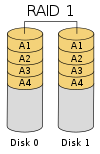
Advantage of this method: Even if one disk fails, we can still read the whole data from the other disk where the data was stored, provided it is working fine. Thus our system can still stay up and running while the affected disk is being replaced!
Those who want to know more about the other ways of doing this, check this link out
http://en.wikipedia.org/wiki/RAID#Standard_levels
Now we come to the advantages and disadvantages of using a RAID disk
Advantage:
1) They can make excellent backup drives especially when they are employed as backup devices to the main drives and particularly when they are located away from the main system.
2) It increases the performance and reliability of a system as regular checks are done to check for any possibility of a system crash
Disadvantage:
1) RAID disks are essentially designed and extensively written for servers. Thus if there is a server, there has to be a network as well and this can cause configuration issues as each network is different.
2) High cost of Purchase (doesn't cost less than a few thousand of dollars)
This post would be incomplete without any mention of WHEN do we use a RAID. It is all very well knowing what RAID does but not knowing when to apply it can be problematic in view of the high cost of purchase as mentioned above.
We can use them in mainly 3 ways:
1) Business Servers: Large business companies require a secure way of storing large amounts data without suffering any loss of the same. RAID can be used for this purpose especially if it is stored in a remote location where accidental erasure of data is pretty much impossible to do.
2) Workstations: "Individuals who are doing intensive work such as video file editing, graphical design,etc. should use a RAID" (taken from http://www.pcguide.com/ref/hdd/perf/raid/why.htm) RAID 0 will provide the improved performance needed in many of these applications (remember what I wrote earlier about improved bandwidth?).
3) Home PC: Most of us use this and we don't need RAID as the high cost of purchase is not justified by the activities we perform with the PC. It's better for us to use SATA/IDE instead (For those who don't know what SATA/IDE is, go here http://smblog.iiitd.com/2010/07/hard-disks-advantage-of-sata-over-ide.html).
Thus we can say that RAID is best used by big companies that can afford to purchase it as it gives them their money's worth over the security of their data which is a very important thing in this world.
If anyone wishes to add something else to the above, go ahead and do so =D
SOURCES:
http://en.wikipedia.org/wiki/RAID
http://www.webopedia.com/TERM/R/raid.html
http://www.ecs.umass.edu/ece/koren/architecture/Raid/raidhome.html
http://www.raid-data-recovery.net/advantages-raid.html
IMAGES:
Subscribe to:
Posts (Atom)